Try MiniMax H3 on a Cloud GPU: Images, Hardware and Rental Costs
·7 min read
After watching an H3 clip, you may want to try your own material: animate a product photo, make a short shot, or turn an idea into video with sound.
Then deployment gets in the way. Your computer may not be suitable, and there is a list of GPU names, memory sizes and software versions before you even see a generation button. A cloud GPU offers a way to investigate a prepared environment without buying hardware first.
Keep the first task small: one subject and one short action. Watch the sample with that task in mind. Does movement stay coherent? Does the subject remain consistent? Does the audio fit? Those observations are more useful than memorizing specifications.
Checked September 13, 2026. This guide verifies the community image listing and configuration quotes with real screenshots. We did not create a paid instance or test inference speed, success rate or output quality.
Start with the H3 image, not an unrelated environment
The Compshare listing below is a community image by the creator 与AI同行. It is not an official MiniMax image. A prepared workbench may reduce setup work, but it is not a guarantee that the complete official pipeline has been reproduced.
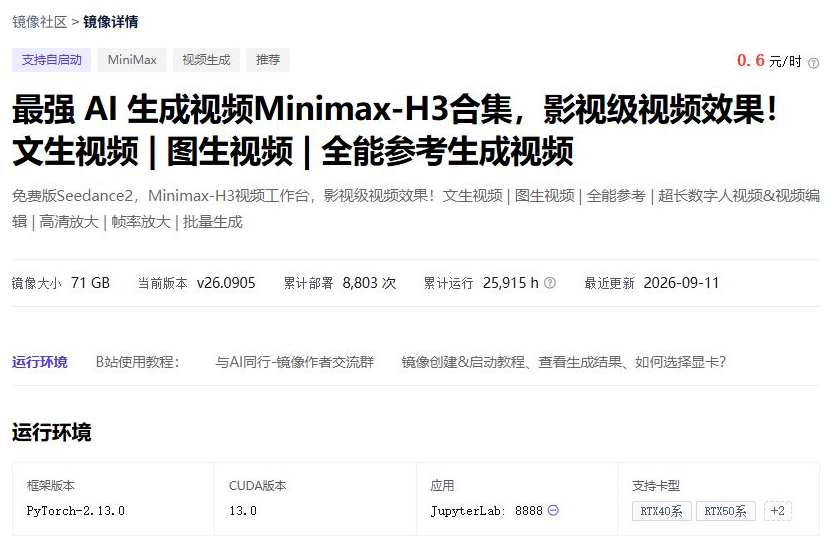
Check the version and instructions before entering the configuration page. A generic PyTorch or ComfyUI image is not automatically the environment used by this tutorial. The listing's “free Seedance 2” wording is the creator's marketing; this guide concerns H3, not an official Seedance model or a promise of free use.
MiniMax also distinguishes local H3-Base validation from its full 2K workflow using hosted services. Confirm which path the current community image implements and whether any features call additional services. Read the official workflow description.
Separate GPU memory, host memory and availability
The image author recommends 48GB of VRAM. During this check, however, the 48GB configuration in North China 2A ultimately showed no available resources. A suggested specification is not a guarantee of current supply.
Shanghai 2A accepted a single 32GB 5090 configuration and returned a complete quote. We use it as a pricing example, not proof that every H3 mode, duration and resolution will run on that machine.
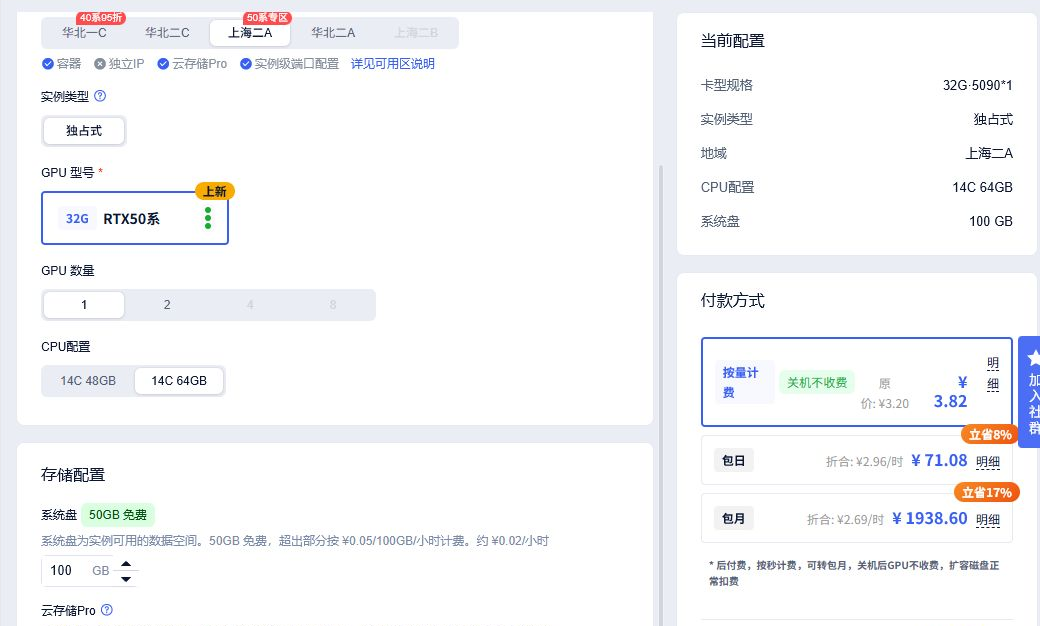
Here, 32GB is GPU VRAM, 64GB is host RAM, and 100GB is the selected system-storage allocation. More host RAM does not mean more VRAM. Nor should two 24GB cards be treated as an automatic substitute for one 48GB card: the actual software must support that arrangement.
The 100GB storage selection is not a tested minimum. The unpacked environment, model files, input material and output clips all need space. Match the image instructions to the intended task and clarify unsupported settings before paying.
Use our GPU rental comparison and 5090 rental page to compare channels. A quote answers where hardware is advertised; the image and workload determine whether that hardware is suitable.
The CNY 0.60 image fee is not the whole rental bill
The CNY 0.60 hourly amount in the screenshot is the community-image usage fee, not the GPU rental rate. Expand the pay-as-you-go quote to see the instance, storage and image charges together.
The following is a September 13, 2026 quote, kept to explain the bill rather than advertise today's rate. For a new rental, choose the region, GPU count, CPU and host RAM, then expand the complete quote on the creation page.
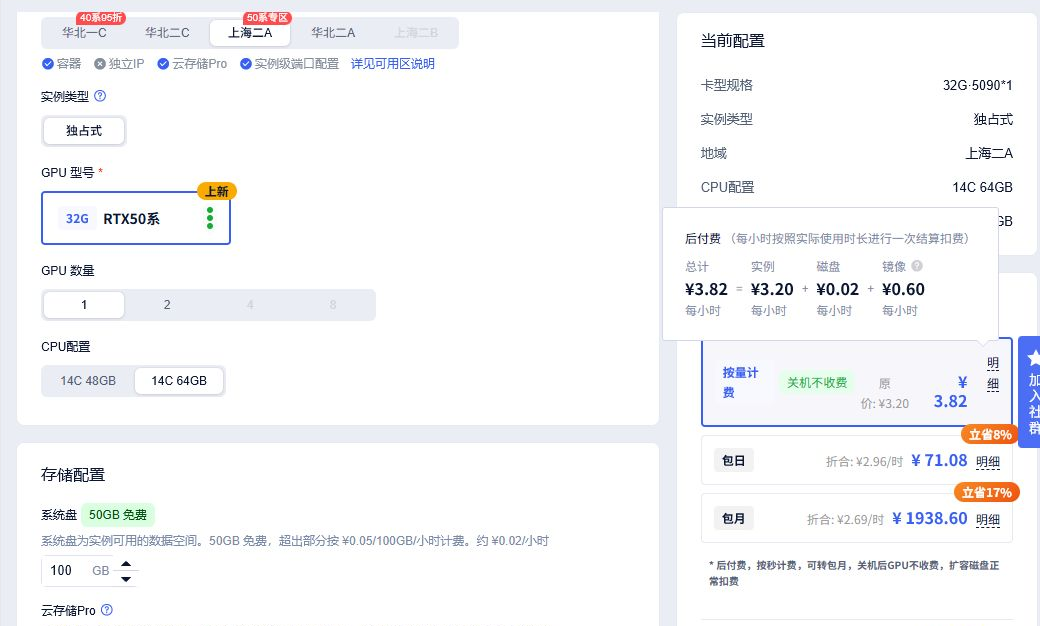
| Charge | What it covers | CNY / hour |
|---|---|---|
| GPU instance | The selected GPU, CPU and host RAM | CNY 3.20 |
| Storage | The disk charge for this configuration, with 100GB system storage selected | CNY 0.02 |
| H3 image | Community-image usage, billed separately from the GPU instance | CNY 0.60 |
| Total | The three items above; additional services are not included | CNY 3.82 |
These values preserve the console's displayed precision, not an invoice calculation. Storage may settle at finer precision. Availability, promotions and configuration changes require a fresh quote.
This is not CNY 3.82 per video. Downloads, model loading, adjustments and failed attempts can all consume running time. The number of usable clips you get from an hour must be measured with your own settings.
For a first trial, evaluate a specific task with pay-as-you-go billing before choosing a longer commitment. A daily or monthly plan's lower equivalent hourly rate does not settle the total cost, image charges or applicable conditions.
Match the region, GPU count and host configuration when comparing another quote. For multiple cards, check the whole-instance hourly bill; a per-GPU rate alone is not the amount charged for the entire machine.
Prepare a small task before starting the meter
Have an image you are entitled to use and a simple description of the subject, action and camera movement ready. Aim for one short shot you would keep. Avoid testing batches, complex references and high-resolution processing simultaneously.
The creator describes creating an instance from the image, waiting for initialization and then opening the workbench. The current version determines the actual entry point and supported tasks. Before paying, check whether further downloads or external services are required and how they are charged.
When you do test, record the configuration, settings, initial loading time, generation time and final bill together. The quote establishes a starting point; the usable-output rate decides whether the workflow deserves further spending.
Save the output and check what is still billable
Save the clips, inputs and modified workflows, then shut down the instance in the console. Closing the workbench or browser does not stop the instance.
- Pay-as-you-go: the official FAQ says shutdown releases CPU, GPU and RAM and stops instance charges. Extra disk capacity and retained image resources can remain billable.
- Prepaid hourly, daily or monthly plans: shutdown does not stop charges. Check expiry and renewal settings.
- Paid community image: the screenshot's CNY 0.60/hour usage fee is separate from storing a custom image. Check this image's current billing terms and review your final bill.
Billing documentation checked October 16, 2026. Read Compshare's official billing FAQ. The selected resource's order and provider terms govern actual charges.
A stopped instance is not permanent backup storage. Pay-as-you-go instances have retention and reclamation conditions. Back up important files and review Compshare's resource-reclamation rules.
Cloud GPUs are worth investigating when you want repeated experiments with your own material or a local workflow. For occasional clips without environment maintenance, compare hosted tools and APIs as well. Let the task determine the rental decision.
For the broader deployment trade-offs, read our H3 model and GPU-cost analysis. For the separate hosted product, see H3 Max API versus GPU rental. H3 Max is not the same service as this community image.
This article contains referral links. Screenshots capture real Compshare pages, with unrelated areas cropped out and no price or availability edits. Official samples and our quote observations have separate attribution.